
During my 36 years working at General Electric, I first learned how to use an IBM PC in 1985. I then proceeded to work with almost every IBM and Microsoft operating system that was created. I have continued to work with each new Microsoft operating system as it came out on my personal computer. This experience has put me in a position where I can help other people understand how to better use their computer.
I have been volunteering at the Parks & Recreation Community Center, teaching computer classes since 2009. I currently teach Windows 11 classes and will be teaching a Microsoft Word class this summer.
Left Click on a Tab Below for Class Information:
WINDOWS 11 CLASS
USB FLASH DRIVE CLASS
LEFT CLICK ON THE TITLE TO DISPLAY THE TUTORIAL LINKS
Windows 11 Class First Handout
- This Text will display the Windows 11 Class First Handout.
The Internet
- This link will take you to a history of the Internet or World Wide Web.
- This link will take you to the original website created on the Internet.
- This Link will take you to a detailed timeline of the development of the Internet.
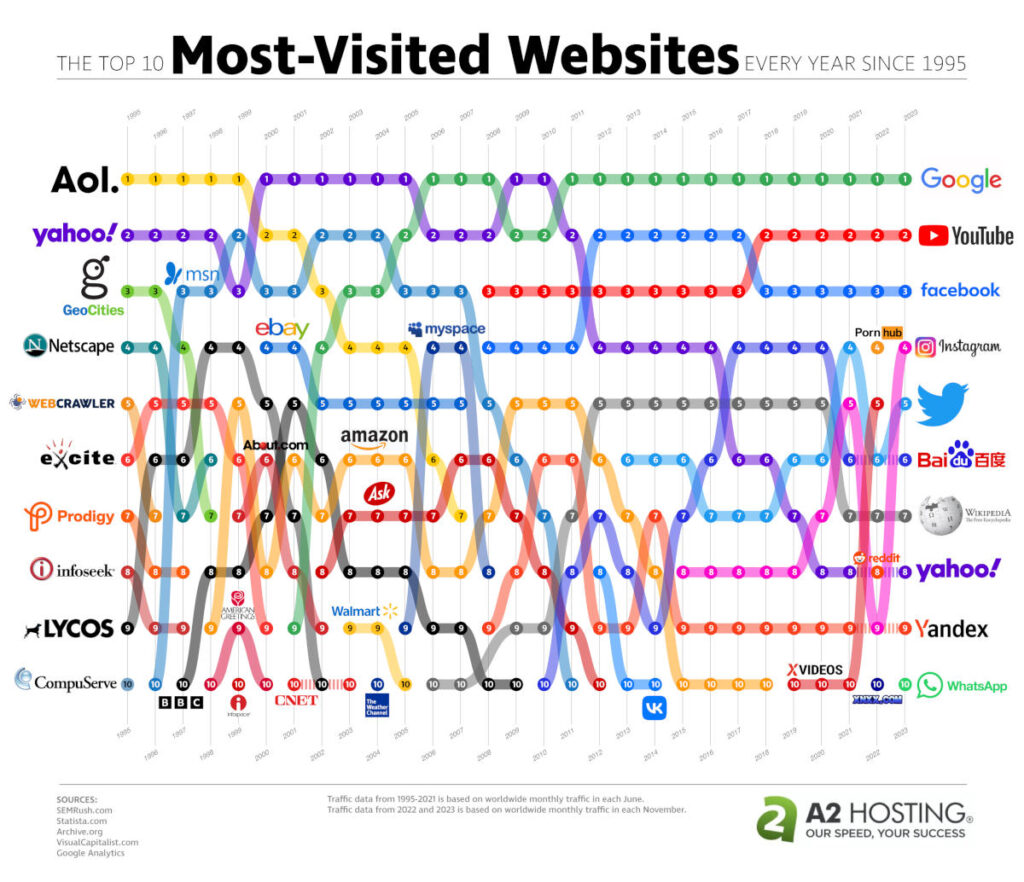
- This Link will show you a chart showing the 10 most visited websites by year.
Using a Web browser
File Storage
File Backup
- This link will take you to a tutorial on how to set up a backup of all your files to the “cloud” using IDrive software. This walks you thru how to download and install the software. Choose Basic (free) for up to 10 GB. Choose Mini ($3 for 100GB, $10 for 500 GB). Choose Personal ($120 for 5TB, $180 for 10TB, and more…) . All costs are per year.
Copy Photos from your Phone using the Import Photos and Videos
Copy Photos from your Phone using the Photos App
Anti-Virus Product Comparisons
Change the Background in Windows 11
- This link will display a tutorial on how to change the Background display in Windows 11.
Microsoft Word Alternatives
- Click on the “Word Alternatives” link below to download a .ZIP file which contains the installation files for both LibreOffice and FreeOffice. Find the file in your Downloads folder. Right-click on the file and then left-click on “Extract all …”. You will now see a pop-up window – left-click on the “Extract” button. You will now see a new folder with the same name as the file. Double-click on the folder to open it and you will see the two installation files.
LEFT CLICK ON THE TITLE TO DISPLAY THE TUTORIAL LINKS
USB Port Colors
- This Link will take you to an article explaining the colors of USB Ports